


Adding Face Login to Your Web Application with the MxFace Face Recognition SDK
Passwords have protected web applications for decades, but modern users expect authentication that is faster, simpler, and more secure.
From employee portals and customer dashboards to banking platforms and healthcare systems, usernames and passwords remain the most common way to verify user identities. While this approach is familiar, it also introduces challenges that organizations can no longer ignore.
Weak passwords, credential reuse, phishing attacks, forgotten login details, and frequent password reset requests create friction for users while increasing operational costs and security risks for businesses.
To address these challenges, organizations are increasingly adopting biometric authentication as an additional layer of identity verification. Among the available biometric technologies, face recognition has emerged as one of the most practical and user-friendly options for modern web applications. Using a standard webcam or mobile camera, users can authenticate within seconds without remembering complex passwords or waiting for one-time passcodes.
For developers, implementing face login no longer requires building complex computer vision models or maintaining biometric infrastructure. Modern SDKs provide the capabilities needed to capture, analyze, and verify facial data, allowing teams to integrate secure biometric authentication with significantly less development effort.
In this article, we'll explore how face login fits into modern authentication workflows, why organizations are adopting biometric login, and how the MxFace Face Recognition SDK helps developers integrate secure face authentication into web applications while preserving existing login systems.
By the end of this article, you'll understand:
- Why traditional authentication methods are evolving.
- Where face login fits within modern web applications.
- How a Face Recognition SDK simplifies integration.
- Key security considerations for biometric authentication.
- Best practices for implementing face login in production environments.
Why Traditional Authentication Is No Longer Enough
Traditional authentication has served organizations well for many years, but today's applications operate in a very different environment.
Users expect seamless access across multiple devices, hybrid work has become the norm, and cyber threats continue to evolve. Development teams must balance strong security with an exceptional user experience.
Some of the most common challenges associated with password-based authentication include:
| Challenge | Business Impact |
|---|---|
| Weak or reused passwords | Higher risk of unauthorized account access |
| Forgotten credentials | Increased support and password reset costs |
| Phishing attacks | Compromised accounts and stolen user credentials |
| Authentication fatigue | Reduced productivity and poor user experience |
| Manual identity verification | Slower onboarding and login processes |
These challenges have accelerated the adoption of passwordless authentication across industries. Organizations are increasingly exploring authentication methods that reduce dependence on passwords while improving both security and user experience. The FIDO Alliance provides guidance on modern authentication approaches, including passwordless technologies and biometric authentication.
These challenges have encouraged organizations to adopt authentication methods that improve both security and usability rather than forcing users to compromise between the two.
Biometric authentication provides a more secure alternative by verifying who users are rather than relying solely on information they know. Instead of replacing passwords completely, face login often complements existing authentication methods such as passwords, Single Sign-On (SSO), or Multi-Factor Authentication (MFA), adding an additional layer of identity assurance.
What Is Face Login?
Face login is a biometric authentication method that verifies a user's identity using their facial features instead of relying solely on passwords or PINs.
Rather than remembering another set of credentials, users simply look at their device's camera while the application securely confirms their identity before granting access.
Modern face recognition systems analyze distinctive facial characteristics, compare them against securely enrolled biometric templates, and determine whether the captured face belongs to the registered user.
For developers, face login provides another authentication option without fundamentally changing how existing applications work. Instead of replacing usernames, passwords, or Single Sign-On (SSO), it integrates seamlessly alongside these methods to provide a faster and more convenient login experience.
Today, face login is widely used across industries, including:
- Employee self-service portals
- Human Resource Management Systems (HRMS)
- Banking and financial platforms
- Healthcare applications
- Customer portals
- Education management systems
- Enterprise access management solutions
As organizations continue adopting passwordless and multi-factor authentication strategies, face login is becoming an increasingly important component of modern identity verification.
Why Developers Are Choosing Face Recognition SDKs
When planning biometric authentication, development teams generally have two choices:
- Build and maintain a face recognition system internally.
- Integrate an enterprise-ready Face Recognition SDK.
While open-source computer vision libraries allow developers to experiment with facial recognition, building a production-ready authentication system requires much more than detecting a face within an image.
A complete biometric authentication solution typically includes:
- Accurate face detection
- Reliable face verification (1:1 matching)
- Image quality assessment
- Liveness detection for anti-spoofing
- Camera integration
- Secure biometric template management
- Performance optimization
- Cross-platform compatibility
- Continuous model improvements and maintenance
Developing and maintaining these capabilities internally requires significant engineering effort, particularly when authentication must remain secure, fast, and reliable at enterprise scale.
That's why many organizations choose the MxFace Face Recognition SDK. Instead of spending months building biometric infrastructure, developers can integrate enterprise-grade face authentication into existing login workflows and focus on delivering business functionality.
How Face Login Fits into Existing Web Applications
One of the biggest misconceptions about biometric authentication is that implementing face login requires redesigning an application's entire authentication system.
In reality, most organizations integrate face login alongside their existing authentication methods, allowing users to choose the most appropriate sign-in option while maintaining established security workflows.
A typical authentication journey looks like this:
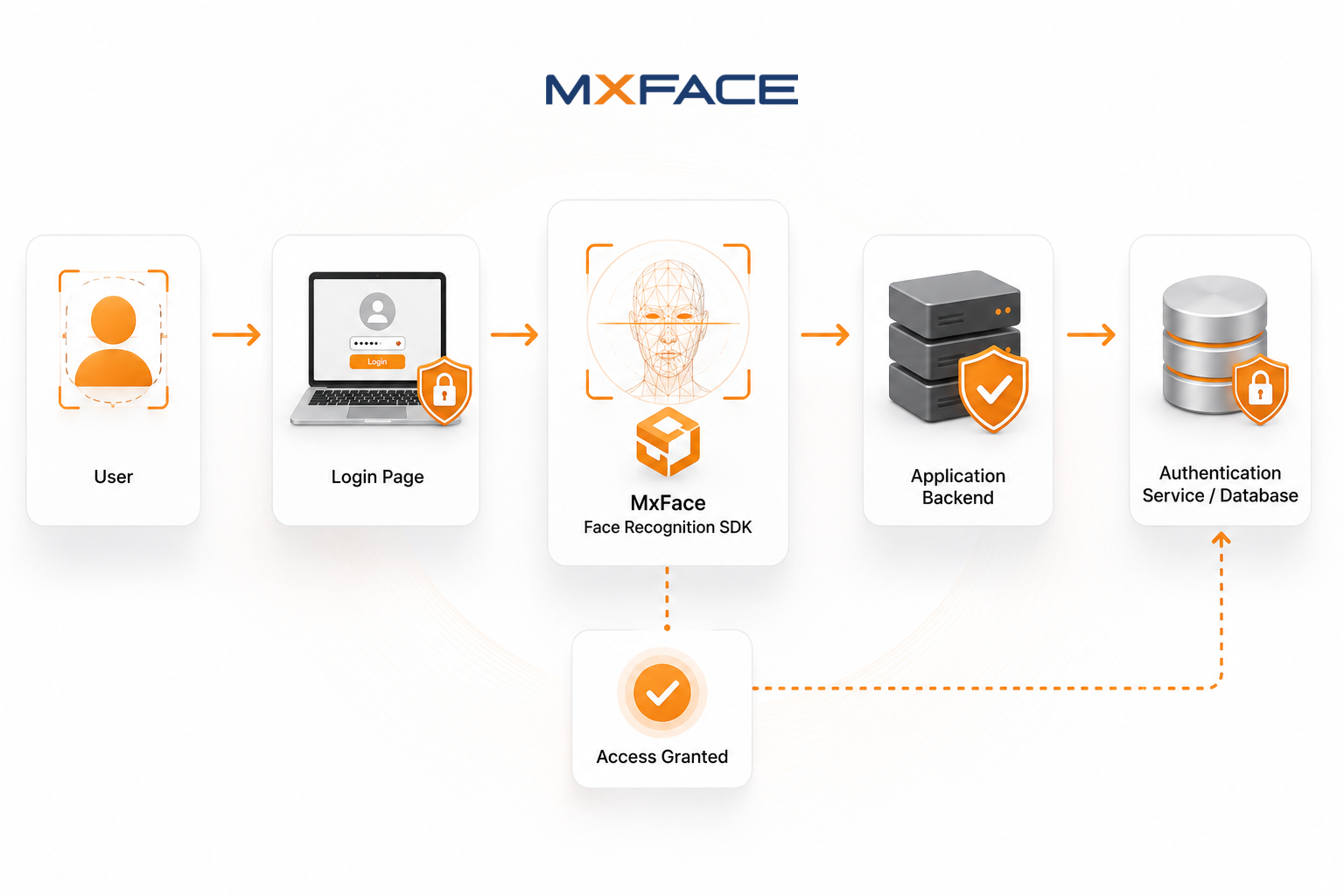
- User enters their username or email address.
- The application verifies the user's password or Single Sign-On (SSO) credentials.
- The Face Recognition SDK performs biometric verification.
- Once the user's identity is confirmed, secure access is granted.
Organizations adopting passwordless authentication may also use face recognition as the primary authentication method after an initial enrollment process.
This flexible approach enables businesses to introduce biometric authentication gradually without disrupting existing user workflows or requiring large-scale application redesigns.
From a development perspective, session management, authorization, and business logic remain unchanged. The Face Recognition SDK simply becomes an additional identity verification layer that integrates naturally into the existing authentication pipeline.
Why the MxFace Face Recognition SDK?
Selecting the right biometric authentication solution involves more than choosing a face recognition algorithm. Development teams also evaluate integration effort, platform compatibility, recognition accuracy, long-term maintenance, and scalability.
The MxFace Face Recognition SDK is designed to simplify biometric authentication by providing developers with enterprise-ready components that can be integrated into existing applications without building recognition technology from scratch.
Key capabilities include:
- High-accuracy face recognition
- One-to-one (1:1) face verification
- Fast biometric matching
- Face detection and enrollment
- Passive liveness detection support for anti-spoofing
- Cross-platform SDK compatibility
- Enterprise-ready authentication integration
Rather than investing engineering resources into developing and maintaining biometric algorithms, development teams can focus on user management, authorization, reporting, and business functionality while relying on the SDK for secure identity verification.
Security Considerations for Face Login
Adding biometric authentication improves convenience, but it also introduces additional security responsibilities. A well-designed face login implementation should protect user privacy while ensuring biometric information is handled securely.
Protect Biometric Data
Biometric information should never be treated like ordinary application data. Organizations should securely manage biometric templates, encrypt sensitive information, and follow industry best practices for storage and transmission.
Using HTTPS for communication between clients, backend services, and authentication servers helps protect biometric information from interception.
Prevent Presentation Attacks
Attackers may attempt to authenticate using printed photographs, replay videos, or digital screens. To reduce these risks, modern biometric authentication systems incorporate liveness detection that verifies a real person is present during authentication.
Developers can strengthen authentication workflows by integrating the MxFace Passive Liveness Detection API, helping protect applications against presentation attacks while maintaining a frictionless user experience.
Respect User Privacy
Organizations should clearly explain why facial authentication is being used, how biometric information is processed, what data is stored, and how user privacy is protected.
Providing alternative authentication methods also improves accessibility and allows users to choose the authentication option that best suits their needs.
Design for Authentication, Not Surveillance
Face login is intended for verifying the identity of users who have voluntarily enrolled in an application. It should not be confused with surveillance or continuous monitoring.
Keeping biometric authentication focused on consent-based identity verification helps organizations maintain regulatory compliance while strengthening user trust.
Best Practices for Integrating Face Login
Offer Face Login as an Optional Authentication Method
Allow users to enable or disable biometric authentication through their account settings while continuing to support traditional login methods.
Keep Existing Authentication Options Available
Face login works best when it complements passwords, Single Sign-On (SSO), or Multi-Factor Authentication (MFA), providing flexibility for different user scenarios.
Capture High-Quality Enrollment Images
Authentication performance begins with a quality enrollment process. Encourage users to capture clear facial images under proper lighting while looking directly at the camera and avoiding heavy obstructions.
Think Beyond Login
Once biometric authentication is implemented, organizations often expand its use to additional workflows such as:
- Approving high-value transactions
- Employee attendance verification
- Secure workstation login
- Digital onboarding
- Identity confirmation before accessing sensitive account settings
Planning for these scenarios early creates a more consistent authentication experience across the application.
Where Face Login Delivers the Greatest Value
| Industry | Example Use Cases |
|---|---|
| Enterprise | Employee portals, HRMS, workstation login |
| Banking & Finance | Digital banking, customer authentication, transaction approval |
| Healthcare | Patient portals, staff authentication, medical record access |
| Education | Student portals, online examination authentication |
| Government | Citizen services, digital identity verification |
| Retail | Customer self-service kiosks, loyalty programs |
Why Choose the MxFace Face Recognition SDK?
Building a reliable biometric authentication solution involves much more than recognizing a face. Development teams must also consider image quality, security, identity verification, scalability, and cross-platform compatibility.
The MxFace Face Recognition SDK provides a structured and developer-friendly approach to integrating biometric authentication without requiring organizations to build and maintain complex recognition technology.
Depending on application requirements, developers can leverage capabilities including:
- Face Detection
- Face Enrollment
- Face Verification (1:1 Matching)
- Passive Liveness Detection
- Cross-platform SDK Support
- Enterprise-ready Integration
This enables development teams to focus on building business applications while confidently integrating secure biometric authentication into existing workflows.
Final Thoughts
Authentication has evolved significantly over the past decade. While passwords remain an important part of many systems, users increasingly expect login experiences that are both secure and effortless.
Face login addresses this need by providing fast, contactless, and intuitive authentication that integrates naturally with existing web applications.
Rather than replacing current authentication systems, a Face Recognition SDK extends them by adding an additional layer of identity verification while preserving existing login workflows.
Whether you're modernizing an employee portal, building a customer-facing platform, or strengthening enterprise authentication, the MxFace Face Recognition SDK enables developers to deliver secure, scalable, and user-friendly biometric login experiences.
Frequently Asked Questions (FAQ)
1. Is face login a replacement for passwords?
No. Most organizations use face login alongside passwords, Single Sign-On (SSO), or Multi-Factor Authentication (MFA) to provide users with multiple secure authentication options.
2. Can face login be added to an existing web application?
Yes. In most cases, face authentication can be integrated into existing login workflows without redesigning the application's authentication system.
3. Why use a Face Recognition SDK instead of building a custom solution?
A Face Recognition SDK provides pre-built capabilities such as face detection, face verification, enrollment, and liveness detection, reducing development effort while allowing teams to focus on core business functionality.
4. Is biometric authentication suitable for all industries?
Yes. Face login is widely used across enterprise, banking, healthcare, education, government, retail, and many other industries where secure and convenient identity verification is important.


